AI TOOL / #08846
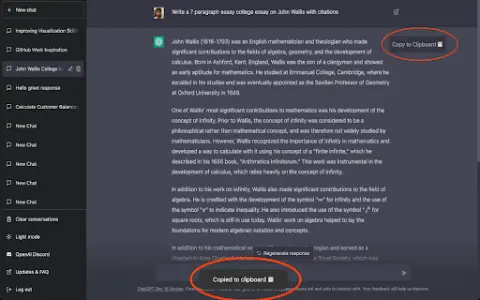
Copy for Chat GPT
An extension used to copy ChatGPT responses and check for plagiarism.
Introduction
Extension to copy ChatGPT responses and check for plagiarism.
What is the Plagiarism Detector Extension for Chrome – an extension/plug-in for Google Chrome?
This extension allows you to copy the responses generated by ChatGPT by clicking a button or using the CMD+K shortcut key, and then have those responses checked by plagiarism detection tools.
How to use the Plagiarism Detector Extension for Chrome?
You can use this extension by clicking the copy button on ChatGPT’s response or by pressing CMD+K. The copied text will be automatically checked to determine whether it contains any plagiarized content.
The core functionality of the Plagiarism Detector Extension for Chrome.
One-click to copy the response from ChatGPT
Use the CMD+K shortcut key to copy.
Automatic plagiarism detection
Related
INK
AI-powered content marketing and SEO assistance tools
NovelAI
An AI-assisted platform for story creation and image generation, offering subscription-based access.
Promarkia
An artificial intelligence-based marketing platform designed for automated content creation and social media management.
Koah
A native AI advertising platform designed to place contextual ads within the responses generated by LLMs.
GPT4Free
Get free access to ChatGPT and AI tools.
Metaminder AI Tutor
AI-Tutor is an innovative online platform that utilizes artificial intelligence to provide students with instant answers, eliminating the need for lengthy waits in order to receive feedback.