AI TOOL / #07462
Vision AI
A Chrome extension that enables AI-driven insights based on screenshot data.
Introduction
Chrome extension for AI-powered insights from screenshots.
What is a Vision AI Chrome extension/plug-in?
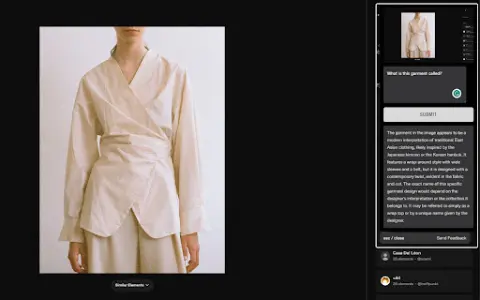
Visual AI is a Chrome extension that combines screenshot functionality with AI-driven insights to enhance online information search. It allows users to capture any portion of a web page, add notes or questions, and receive AI-generated responses based on the context of the captured image.
How to use the Vision AI Chrome extension/plug-in?
Install the Visual AI Chrome extension. Use CTRL + SHIFT + Y to take a screenshot, and then add any notes or questions you have. Visual AI will analyze the screenshot and provide an AI-generated response.
The core functions of the Vision AI Chrome extension/plugin
Screenshot capture
Interactive AI Suggestions
Seamless browser integration
Suitable for a wide range of applications in various fields
Privacy and Security
Related
Welcome to AllGalaxy
An AI-driven mental health platform that provides personalized insights and care recommendations.
Smartlink Health
Configure telehealth visits in real time from EHR scheduling for Smartlink SDC clinics.
Gala Coach
The AI-based platform provides affordable GLP-1 drugs and personalized weight loss support.
MyItura
MyItura provides tools for healthcare providers and offers telehealth services to patients.
ADHDtest.ai
Artificial intelligence-based online ADHD assessment and diagnosis platform.
AutoNotes AI
AutoNotes is an AI-powered tool that assists therapists in creating progress reports, treatment plans, and clinical documents.