AI TOOL / #07222
ReadImage
Extract, edit, and copy text from images on web pages.
Introduction
Extracts, edits, and copies text from images on web pages.
What is Image Text Extractor ai chrome extension/plugin?
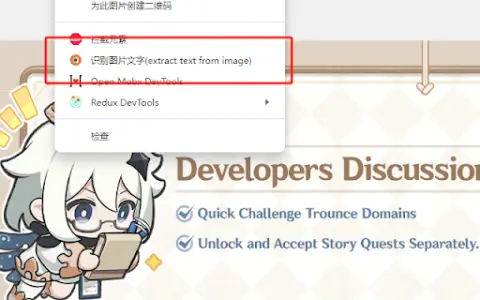
This extension allows users to extract text from images displayed on web pages. It supports common image formats such as jpg, jpeg, png and bmp. After extraction, the text can be edited and copied.
How to use Image Text Extractor ai chrome extension/plugin?
Hover your mouse over the image, right-click and select "Extract text from image". Press "Ctrl + Q" to view the extracted text on the extension page, where it can be edited and copied.
Image Text Extractor ai chrome extension/plugin core features
Extract text from images on web pages
Edit extracted text
Copy extracted text
Related
Claude 3
A company dedicated to the security and research of artificial intelligence, striving to develop reliable, explainable, and guided AI systems.
Veriom
An AI platform for real-time cybersecurity and compliance management, built for modern systems.
Lixsa.ai
An AI customer service platform that automates tasks and enhances customer interactions.
GenFuse AI
No-code AI agent building platform for automating business operations.
Websparks
An AI-driven platform designed for rapid development of websites and applications.
Ask On Data
An open-source, chat-based ETL tool powered by artificial intelligence, specifically designed for data engineering tasks.