AI TOOL / #07177
Chrome Virtual Camera
Use the clock, video file, and background masking options in place of getUserMedia().
Introduction
Replaces getUserMedia() with clock, video file, and background masking options.
What is the getUserMedia() Replacement AI Chrome extension/plug-in?
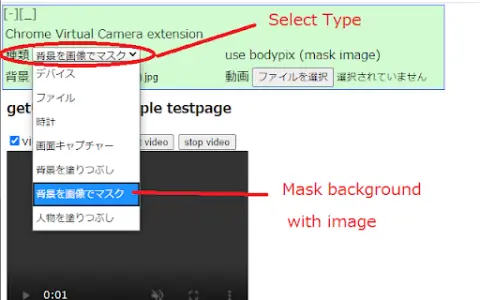
This tool replaces the standard getUserMedia() function, enabling the use of clocks, video files, as well as the tfjs/body-pix technology as background masks for video sources.
How to use the getUserMedia() Replacement AI Chrome extension/plug-in?
This tool intercepts calls to the getUserMedia() function and provides alternative video sources, such as clocks, video files, or video streams with masks using tfjs/body-pix. The specific implementation and configuration details depend on the particular library or technology being used.
The core functionality of the getUserMedia() replacement AI Chrome extension/plug-in
Replace the getUserMedia() function
Provide a clock as the video source.
Provide a video file as the source material for the video.
Implement background masking using tfjs/body-pix.
Related
Hello Assist
An artificial intelligence platform that offers personalized AI assistants for shopping, work, career development, and health management.
Am I Getting Fatter Quiz
An AI-based body analysis test that provides personalized health recommendations.
Inspire AI
An artificial intelligence-based application that provides personalized motivational messages and daily encouragements.
AIWidgetPro
Enhance a website's SEO performance and increase user engagement by using AI widgets.
ONVY
An AI health coach connected to wearable devices provides personalized health insights and actionable feedback.
pearhealthlabs.com
Adaptive digital coaching software designed to enhance personalized fitness and overall health.