AI TOOL / #06759
Chromesthesia
Capture audio tagged with relevant labels and use various audio recognition services to analyze them.
Introduction
Captures tab audio and identifies it using various audio recognition services.
What are Audio Recognition Services, and what are the Chrome extensions/plugs related to AI?
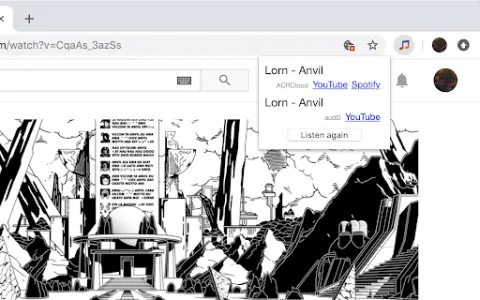
This service captures the audio being played within browser tabs and sends it to audio recognition services. Currently supported services include audD (no account required; 10 free requests per day), ACRCloud (account needed, but a free plan is available), and AudioTag (account needed, but a free plan is available).
How to use the Audio Recognition Services Chrome extension?
This service captures the audio being played within browser tabs and automatically sends it to the configured audio recognition services (such as audD, ACRCloud, or AudioTag). The identified song information is then returned.
The core functionality of the Audio Recognition Services AI Chrome extension/plug-in
Capture audio from a browser tab
Integration with various audio recognition services (audD, ACRCloud, AudioTag)
Related
MiniMax Image-01
MiniMax is an artificial intelligence company that offers models for text, speech, and video generation, which can be integrated through APIs.
AI Voice Generator – Text to Speech Voice Reader
A text-to-speech tool that utilizes OpenAI’s TTS models, suitable for a variety of platforms.
Natiq
Natiq is a TTS technology that converts Arabic text into natural speech.
OpenAI Text To Speech WebUI
A free web interface that uses the OpenAI API to convert text into speech.
Voice Out
A Chrome extension that converts text into speech, capable of reading digital content in multiple languages.
Ask Maya
An artificial intelligence-based English tutoring tool designed to help improve conversational skills through real-time feedback – available whenever you need it.