AI TOOL / #06171
Patsa – AI-powered Meeting Copilot
A Chrome extension that enables real-time transcription and AI-powered Q&A during online meetings.
Introduction
Chrome extension for real-time transcription and AI-powered Q&A during online meetings.
What is the Patsa AI Chrome extension/plugin?
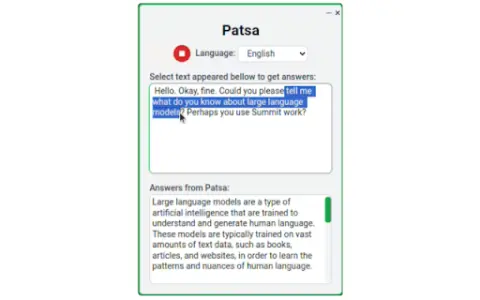
Patsa is a Chrome browser extension designed to enhance online meetings on platforms such as Google Meet, Zoom, and Teams. It transcribes other participants’ speech in real time and lets users select transcribed text to ask AI questions, providing instant information and answers.
How do I use the Patsa AI Chrome extension/plugin?
1) Launch the Patsa extension in any online meeting in Chrome. 2) Click the "Start Transcribing" button to transcribe what the other participants are saying. 3) Select the transcript text you want to ask the AI about, and you'll receive an instant response from the AI.
Core features of the Patsa AI Chrome extension/plugin
Real-time transcription of participants’ speech
AI Q&A based on transcribed text
Related
Notenit
An AI-assisted browser extension designed to help users save, organize, and understand the content of web pages.
MyReport
Utilize tools that leverage enhanced intelligent automation to generate reports, thereby facilitating data collection and citation.
Heuristica
An artificial intelligence-based mind mapping tool, designed for visual learning and research purposes.
Revam Product Sniper Extension
Look for Chrome extensions that offer profitable products and help you connect with suppliers.
Product Roaster
AI-powered idea validation tool that provides market research and SWOT analysis.
Tylo AI
Tylo AI extracts insights from research in order to streamline the process of innovation.