AI TOOL / #04208
Shift-Ctrl-F: Semantic Search for the Browser
A Chrome extension that uses MobileBERT to search for and highlight answers on web pages.
Introduction
Chrome extension using MobileBERT to search and highlight answers on webpages.
What is the Shift-Ctrl-F Chrome extension/plugin?
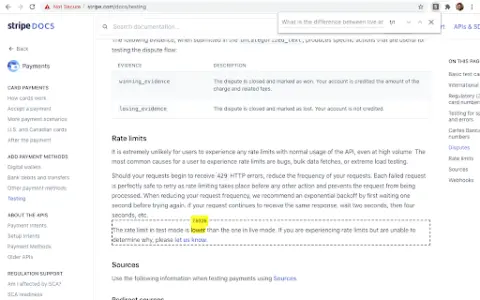
Shift-Ctrl-F is a Chrome extension that utilizes the MobileBERT model, which has been fine-tuned using the SQuAD dataset. This extension uses TensorFlowJS to search for answers on web pages and identify relevant elements. It allows users to enter natural-language queries and find corresponding answers within the content of the current page.
How to use the Shift-Ctrl-F Chrome extension/plugin?
1) Open the extension pop-up window using the toolbar or shortcut key (Shift-Ctrl-F).
2) Enter your natural language query in the search box.
3) Press Enter and wait for the model to return the results.
The core functionality of the Shift-Ctrl-F Chrome extension/plug-in.
Conduct natural language question-and-answer interactions on web pages.
Highlight relevant elements based on the search query.
Efficient processing using MobileBERT
Related
Fireflies.ai
The AI conference assistant is capable of recording, transcribing, and summarizing meetings held on multiple platforms.
UnleashX
Cross-departmental enterprise AI employee platform
ShareOne
Sharing and word-highlighting feedback for pages generated by AI
Qovest
The AI research and investment assistant launched by Alibaba Cloud
Glasshand
Renting real iPhones and Macs for AI agents
DocsAlot
A managed document platform that can be read by both humans and AI systems