AI TOOL / #04050
AI Roundtable
Ask a question and receive answers from multiple AI assistants.
Introduction
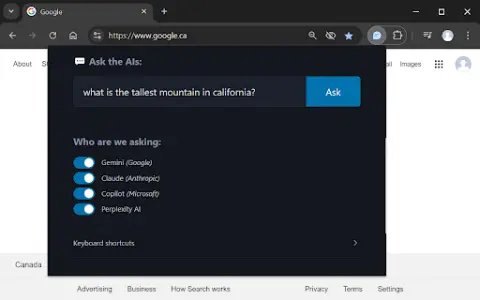
Ask one question, get answers from multiple AI assistants.
What is a Multiple AI Assistants Chrome extension/plug-in?
This website allows users to submit questions at once and receive answers from multiple AI assistants. Users can customize which assistant they want to use for their queries. The website also provides keyboard shortcuts, making it easy to access various functions quickly.
How to use the Multiple AI Assistants Chrome extension?
Use the shortcut keys Ctrl/Cmd + Shift + Q to open the query window and start typing your question. Use Alt + 1 to switch to Gemini, Alt + 2 to switch to Claude, Alt + 3 to switch to Copilot, and Alt + 4 to switch to ChatGPT.
The core functions of various AI Assistant extensions/plugins for Chrome.
Query multiple AI assistants simultaneously
It is possible to customize the selection of AI assistants.
Convenient and fast keyboard shortcuts
Related
Kaizan
An AI-powered customer intelligence platform designed for teams dedicated to ensuring customer success, aimed at helping businesses retain and increase their revenue.
PrometheanAI
An artificial intelligence assistant designed to assist artists in creating virtual worlds and addressing various creative challenges.
financialaidtv.com
An artificial intelligence-based platform for engaging higher education students.
Walling AI
Walling is a visualization platform that uses AI to assist organizations in their work and help them showcase their creativity.
texts.com
Texts combines multiple messaging platforms into a single inbox with AI assistance and privacy protection.
EarnBetter
An AI-based job-seeking assistant that helps with the creation of resumes and cover letters, as well as facilitates job matching.