AI TOOL / #03900
AiAsk Summary
A Chrome extension tool that extracts article outlines to improve reading and research efficiency.
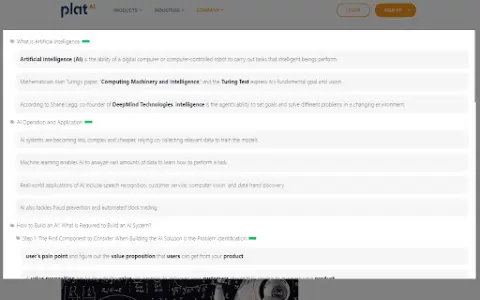
Introduction
Chrome extension that extracts outlines from articles for enhanced reading and research.
What is the AiAsk Summary AI Chrome extension/plugin?
AiAsk Summary is a Chrome extension designed to enhance your reading and research experience. It cleverly extracts the main outline of any article you browse, providing a structured overview of its content.
How do I use the AiAsk Summary AI Chrome extension/plugin?
1. Browse: Open any article in the Chrome browser.
2. Activate: Click the icon in the browser toolbar or the icon on the right side of the page.
3. Extract: This extension analyzes the article and displays a concise outline.
Core features of the AiAsk Summary AI Chrome extension/plugin
Automatic outline generation
User-friendly interface
Improve reading efficiency
Supports YouTube videos
Show detailed content when the outline is ready.
Related
VideoLingo
An AI-powered video localization tool, used for generating subtitles and adding voiceovers.
Taskade
Mind map generation tool
Typeframes
AI video generator for easily creating trending short videos.
Beatoven.ai
Royalty-free AI music generator for videos, podcasts, and games.
AssemblyAI
AssemblyAI: An artificial intelligence model used for voice-to-text transcription and the analysis of audio data.
Flair AI
An AI design tool used to create images for brand products and e-commerce materials.