AI TOOL / #03007
Design My Room
Let AI-generated designs help you redesign your room in just a few seconds.
Introduction
Redesign your room in seconds with AI-generated designs from a single photo.
What is “Design My Room”?
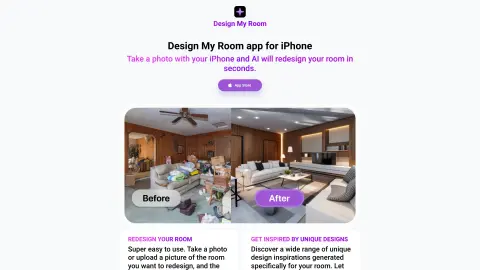
The “Design My Room” app allows you to completely redesign your room in just a few seconds, all by taking a single photo. Simply take a picture of your room, and the iPhone app will provide you with 5 different design options. It’s extremely easy to use: just take a photo or upload an image of the room you want to redesign, and the app will generate 5 unique design ideas. Discover a range of creative designs specifically tailored for your room – let this app inspire your home renovation project!
How to use Design My Room?
Use your iPhone to take photos of the room, or upload existing images. The app will generate five different design ideas for your room.
The core functions of Design My Room
Redesigned rooms powered by AI
For each photo, 5 different design options are generated.
Easy photo upload
Unique design inspiration
Related
MaxNotes
An AI-powered voice note organization tool with transcription, summarization, and categorization features.
PlainScribe
PlainScribe offers transcription, translation, and summarization services for audio and video files on a pay-as-you-go basis.
ChatGPT Voice Plus Game and Translation
A Chrome extension designed for voice interactions, gaming, and translation with ChatGPT.
MemoJournal
A voice-based diary app that uses AI to convert speech into text.
WaSendPlus – WhatsApp CRM & ChatGPT
A WhatsApp CRM with artificial intelligence capabilities, designed to simplify communication and automate processes.
Chartnote
A tool that utilizes AI technology to accelerate the processing of medical documents, suitable for any web-based EHR system.